Project - 5 : Encrypting in python
project - 5

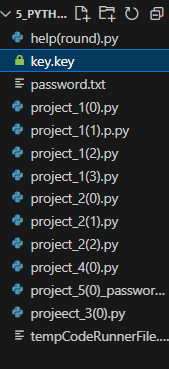
Above is "key.key" file where the key is saved.
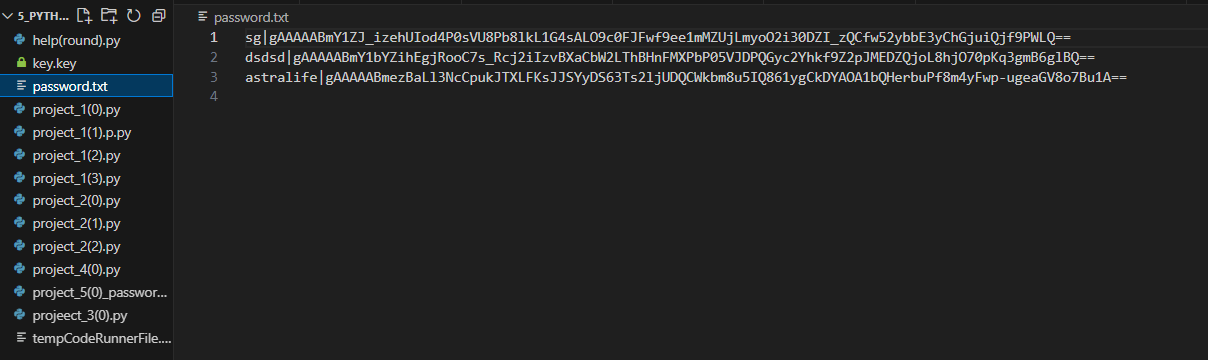
Below is the "password.txt" file where all the password and username are saved.
Link to see the code
Problems That I encountered
Understanding how the cryptography module works.
For now I haven't understood this syntax:
fer.decrypt(passw.encode()).decode())
Using the write() function syntax:
f.write(name+"|"+ fer.encrypt(pwd.encode()).decode() + "\n")How fernet() works
Key is a variable where the load_key() function output is saved.fer =Fernet(key)
fer =Fernet(key)
Functions That I have used
user defined functions :-
add() : It is used to add the password and view the details
view(): To view the information
load_key(): It is used to load the key
fernet : Fernet guarantees that a message encrypted using it cannot be manipulated or read without the key. Fernet is an implementation of symmetric (also known as “secret key”) authenticated cryptography.
.rstrip()
.readlines()
split()
decrypt()
encode() , decode(): an encoder converts information signals into coded digital bitstreams, while a decoder converts those coded bits back into the original information signal. Encoding and decoding are different from encryption and decryption,
input() and print() function
quit() : used to end the code
write() : It is used to manipulate the data in file and
open() : used to open a file or create a file
close() : used to close a file
- 'a': append :used to insert data into the file without overwrttitng existing file.
What I Learned
I learned importing cryptography module it is used to encrypt a text. fernet: It will create a key using the text that has to be encrypted it will combine the text and key and create a random text.
fernet: Fernet guarantees that a message encrypted using it cannot be manipulated or read without the key. Fernet is an implementation of symmetric (also known as “secret key”) authenticated cryptography.
3.1.We have to generate a key that is define a key and next
3.2 load the key once that is done we do not need to define a key again so we comment that part of the code after running the code once.
How it works:
4.1.To encrypt the original text that is converting it into a random text ; we do that by combining key and password . And while decrypting the random text to get the original text it will ask us for a key if that key inputed invalid then it will give us a random text that has no meaning .
4.2. Encrypting : 2 Random text ++ password is used to encrypt.
4.3. Key + password + original_text(text_to_encrypt) = Random text.
4.4.Decrypting : Require valid keys input if input is invalid key it give a randomtext an output that has no meaning.
Only once we define a key and everytime we load the same key each time the code is runned and executed.
open("file_name", "rb") function is used to open a text file if doesn't exists then it create one new file with that name with the file format as 'rb'.
commands : read(r) , write(w) , execute(x)
6.1. read(): this function is to open and read a file only. 6.2]write(): It will overwrite any existing file .It is used to add data into a new file. 6.3]execute() : It is used to execute a file .. 6.4] append() :Existing file can be opened and edited.no overwritten will happen.
"rb" file format of code that is ruby file format.
How to crate a new file using open() and storing the data in a format using user and password
user,passw = data.split("|") #we are using it to separate the user and the passwrodrstrip()isused to remove the carriage returns.
.readlines(): The readlines() method returns a list containing each line in the file as a list item.
Syntax : user,passw = data.split("|")
I learned how to separate the data into rows to be saved in the file we created.
Learned how to define user defined functions and call them when needed. ex:- def add(): #definig a function { code }
add() #calling a function
In the file "key.key" we will enter a random text that is a key .
file.close() we have to manully close the file if do not use 'with' syntax ex:-
    with open('password.txt' , 'r') as f:
# open(file_name , mode) we can create a fime witha name ,
# and we can a define a code with which we can open the file
f.write(name+"|"+ fer.encrypt(pwd.encode()).decode() + "\n") #written the details into the file txt
with open('password.txt' , 'a') as f: file(a:append) #here ' with ' closes file after we edit the file . #No need to use the close() function
Do not recommend this method to save password

![React Beginner [project based learning]](https://cdn.hashnode.com/res/hashnode/image/upload/v1725214935692/ae3dd028-c656-4bf0-8c57-588feeedba13.jpeg)